


Flip from a classic layout to a fighter-ready setup with extra mappable buttons—fast, secure, and built for muscle memory.
187
Reviews
PivotCommand Pro
PivotCommand Pro
Translation missing: en.products.product.price.regular_price
$0.00
Translation missing: en.products.product.price.regular_price
Translation missing: en.products.product.price.sale_price
$0.00
Translation missing: en.products.product.price.unit_price
Translation missing: en.accessibility.unit_price_separator



4.8/5 from PC gamers who demand pro-level control
Meet PivotCommand Pro—the smart, rotating-module controller built to match every genre you play. Swap layouts in seconds, dial in anti-drift precision, and stay connected with on-board notifications and quick settings. One controller, tuned for FPS, fighters, racing, and everything in between.
Rotating layouts
Anti-drift control
20-hour wireless

Switch layouts mid-session—no relearning, just winning
Rotate modules to match FPS, fighters, or retro instantly.

Aim, steer, and combo with smoother anti-drift sticks
Hall-effect thumbsticks stay precise for the long haul.

Stay in the zone with quick settings and smart alerts
Adjust audio, mappings, and notifications from the display.
Two layouts. One controller. Zero compromises.
Wireless for PC, Bluetooth for more, cable for Xbox
Play lag-free on Windows with the 2.4GHz dongle, connect to Android/Smart TVs via Bluetooth, or plug in for Xbox.


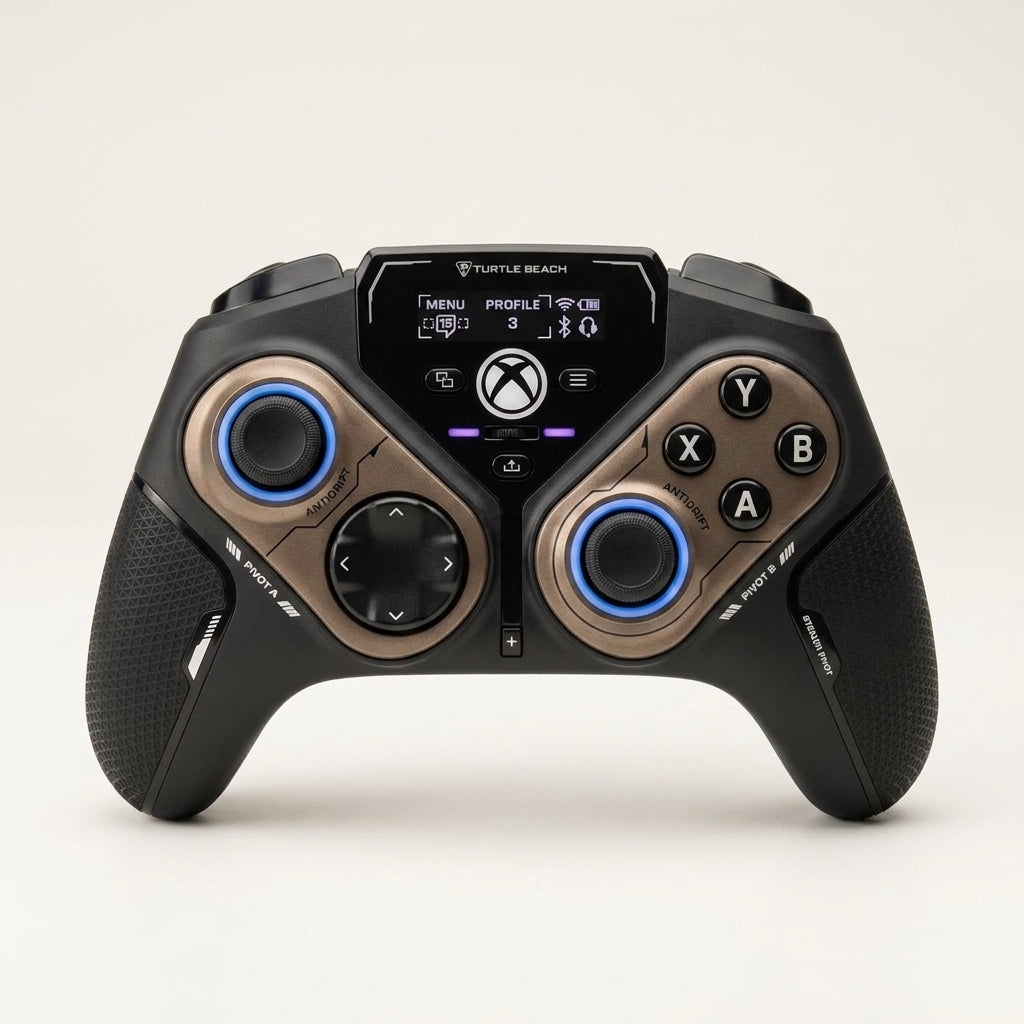
Pro customization without pausing the hype
PivotCommand Pro puts elite tuning at your fingertips—layouts, triggers, sticks, audio, and profiles in seconds.
Rotating Button Modules for every genre
Swap layouts fast for FPS, fighters, retro, and racing.

Hall-Effect Anti-Drift Thumbsticks
Smoother tracking and long-term accuracy without drift.


Adjustable Trigger Stops on-the-fly
Go hair-trigger quick or full-travel precise instantly.

Connected Command Display control hub
Tune audio, remap inputs, and manage connections quickly.
20 hrs
Wireless playtime that lasts through marathon weekends.
2 layouts
Rotate modules to match different game styles instantly.
4+ buttons
Mappable quick-actions for faster reactions and cleaner combos.
2.4 GHz
Lag-free PC wireless with a dedicated USB transmitter.
Why PivotCommand Pro earns a spot on your desk
Built for serious sessions and competitive consistency.
Get PivotCommand ProHigh demand—availability can change quickly.
The controller that adapts—others make you adapt
PivotCommand Pro is engineered for flexibility and precision, so your setup fits the game—not the other way around.
| Pivoting | Anti-Drift | Wireless | Quick-Tune | Pro-Aim | |
|---|---|---|---|---|---|
Your Brand |
|||||
OTHER BRANDS |
Your Brand |
OTHER BRANDS |
|
|---|---|---|
| Pivoting | ||
| Anti-Drift | ||
| Wireless | ||
| Quick-Tune | ||
| Pro-Aim |

Feel the difference the moment you rotate
From precision aim to perfect inputs, PivotCommand Pro turns your controller into a customizable command center—built for competitive PC play and beyond.
Limited Stock
Upgrade your control—risk-free and ready to perform
Premium build, smart features, and genre-ready flexibility.
20-hour battery
Play & charge
Multi-device ready
Profiles onboard
Buy Now
Support and returns follow store policy; keep packaging for easy processing.
Need Help?
FAQs about PivotCommand Pro
Quick answers before you hit “Add to Cart.”
How do the rotating modules work during gameplay?
Slide the rear release switches, rotate one or both modules to your preferred layout, then lock them back in place for a secure feel.
What devices can I use PivotCommand Pro with?
Use the 2.4GHz USB transmitter for Windows PC, Bluetooth for Android and compatible Smart TVs, and the included cable for Xbox Series X|S/Xbox One or wired PC play.
Does it support a headset and audio controls?
Yes—plug any 3.5mm headset in and adjust EQ, chat/game mix, and more from the on-board Command Display.
Can I customize buttons and save profiles?
Yes—map the quick-action buttons and save multiple onboard profiles, then switch setups whenever you change games.
How long does the battery last, and can I play while charging?
You get up to 20 hours of wireless play, and you can keep playing with the included USB play-and-charge cable when needed.